Lar / EPTAHUB Teamspace

EPTAHUB Teamspace

Discover EPTAHUB Teamspace and discover how it can supercharge cross - team collaboration for your upcoming projects.

EPTAHUB Teamspace serves as a dedicated collaborative hub within the EPTAHUB ecosystem. It empowers seamless teamwork among users for project development and custom component procurement. As the cornerstone of a unified EPTAHUB experience, it equips every team member with instant access to quoting data, order submission portals, real - time part progress updates, shipment tracking details and a host of other essential tools.

Learn About Teamspace

This platform is tailored for professionals who thrive in collaborative settings where project - related data needs to be accessed and shared effortlessly. Project supervisors, procurement specialists, purchasing agents, design engineers, product developers and supply chain managers, among other project stakeholders, stand to gain significant advantages from joining an EPTAHUB Teamspace. For example, design engineers can swiftly share their cost estimates, and purchasing agents can conveniently retrieve these quotes to finalize orders without any hassle.

In the subsequent sections, we will break down the various functions and features of Teamspace, enabling you to leverage the platform to its fullest potential.

logo200

Start Exploring Teamspace Today

Team Dashboards

Dashboards are the core of the EPTAHUB Teamspace experience. They act as the central interface for team interactions, allowing members to access critical data such as quotes generated by colleagues and the status of ongoing orders.

To open the dashboards you own or are a part of, start by logging into your account and navigating to your personal dashboard.

Next, locate the drop - down menu in the upper left corner of the page. With a single click, you can switch back and forth between your personal workspace and all the team dashboards you have access to.
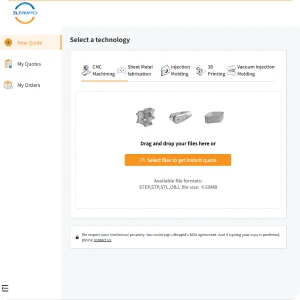
3d300

Teamspace Features

Through the team dashboard, you can pull up detailed information on quotes and orders, view the complete list of team members, monitor the production status of each part and retrieve shipment tracking codes.

Additionally, the dashboard supports the following key actions:
Collaboration Made Easier

EPTAHUB Teamspace revolutionizes collaboration for manufacturing projects. It offers the flexibility to create an unlimited number of teams, and each team can accommodate an unrestricted number of members. You have the freedom to structure teams according to your specific needs: assemble a small group to share and refine quotes, build a dedicated team for a single project or even invite an entire department to join a company - wide collaborative workspace.

The platform also streamlines the entire purchasing workflow. For example, you can generate an instant quote on your personal dashboard. When you are ready to proceed with the order, simply share this quote with your dedicated procurement team via the platform. Purchasing agents can then access the quote directly from the team dashboard to place the order. Once the order is confirmed, every team member can track its progress in real time through the dashboard.


Creating A Team

Setting up a team on EPTAHUB is a quick and straightforward process. Begin by logging into your personal dashboard and clicking on the “User Settings” option. Once you are in the User Settings interface, locate and select “Create a New Team”.
 
From this point, you can assign a unique name to your team and start inviting members. All you need is the email address of the individuals you want to include. After sending the invitations, recipients just need to click the acceptance link in their email to join your team.
 
Note: If the invited individuals do not have an existing EPTAHUB account, they will be guided through a simple, one – time registration process to set up their account securely.
logo200

Get To Know EPTAHUB Better

Frequently Asked Questions

What criteria can I use to search for orders?

You can search for orders using a wide range of filters, including order identification numbers, purchase order numbers, the name of the team member who created the quote, current order status and more.

Who has the authority to add or remove team members?

Only the team creator, who is assigned the Admin role by default, has the ability to add new members or remove existing ones from the team.

Is it possible to be a member of multiple teams?

Absolutely—you can be a member of any number of Eptahub teams with no restrictions. Additionally, there’s no upper limit on how many people can be part of a single team.

Can I invite external partners who are not part of my organization?

Yes. Collaboration is the core design principle of Eptahub Teamspace. Whether you are working with internal colleagues or external third - party vendors, consultants or clients, you are free to invite them to join your teams.

Are there different role options for team members?
There are two primary role types in Eptahub Teamspace: Admins and Contributors. The team creator is automatically assigned the Admin role. Any user who joins the team through an invitation will be given the Contributor role initially.
 
Admins have access to all the features available to Contributors. In addition, they can manage team - related tasks, such as sending or revoking member invitations, viewing or canceling pending invites, assigning different roles to members, and renaming, deactivating or reactivating the team.
Will I be able to view teammates’ unordered quotes?

Yes, you can view these unordered quotes as long as they have been shared with the team or created directly within the team dashboard. These quotes will be displayed in the dedicated quotes section of the team dashboard. Once a quote is turned into an order, it will be moved to the orders dashboard, where you can track its real - time status.

How can I identify which quotes are ready to be processed into orders?

After finalizing the configuration of a shared quote, you can use the "Mark Your Quote" drop - down menu on the quote summary page. You can tag the quote as "For Review", "For Approval" or "Ready for Ordering". This tag will be clearly displayed in the team quotes table on the dashboard. Tagging simplifies the review and ordering process, making it easy to identify which quotes require attention from the purchasing team responsible for placing orders.

What types of order - related documents can I download from Teamspace?
You can download a variety of documents, including order confirmation letters, packing slips, quality inspection reports (when applicable), material compliance certificates (when applicable) and more. To download these documents, simply click the three - dot icon next to the relevant order and select the "Download Documents" option.
How do I rename or deactivate a team?
Team Admins can rename or deactivate a team by clicking the three - dot icon on the Team Name panel. It is important to note that deactivating a team does not delete any associated data, such as active quotes or ongoing orders. It simply hides the team from the dashboard view, and you can reactivate it at any time if needed.
 
Admins can also change member roles or remove members by checking the box next to the member's name on the Team Members list. Then, select the desired action from the drop - down menu in the upper right corner and click the "Update" button to apply the changes.
 
Finally, the Event Log tab in the team dashboard can be used to track all team - related changes, including who made the changes and when they were made.
Can I enable or disable the automatic sharing feature?

Yes. When you join a team for the first time, you will be prompted to decide whether to share your existing quote and order history with the team. If you agree, all your past quotes and orders will be synced to the team dashboard. If you want to set this up later, you can use the "Autoshare My New Quotes" toggle switch. This is a set-and-forget feature. When enabled, every new quote you generate will be automatically shared with the team.

Centro de Recursos Ampliado

Perguntas frequentes sobre o Teamspace estendido

Como funciona o Eptahub

Ofertas da Eptahub Enterprise

Repositório de Conhecimento Eptahub

×

EPTAHUB Orçamentos Profissionais e Inteligentes

Nosso sistema automatizado de orçamentos fornece preços instantâneos para que você possa estimar rapidamente os custos do seu projeto.

Para peças complexas ou de alta precisão, nossos gerentes de contas seniores podem fornecer orçamentos mais detalhados e ajudá-lo a encontrar a melhor solução geral para suas necessidades.

Obtenha um orçamento instantâneo Obtenha um orçamento instantaneamente — ⭐⭐⭐
Solicite um orçamento especializado. Citações Precisas — ⭐⭐⭐⭐⭐