Simplify Custom Part Manufacturing with AI-Powered Instant Quoting. This comprehensive guide breaks down every feature and step to help you turn ideas into tangible parts—fast.
EPTAHUB’s cutting-edge AI platform takes the hassle out of custom manufacturing. Get instant pricing, production lead times, and design-for-manufacturability (DFM) insights for your parts—no more waiting for manual quotes. Our network connects you to over 1,000 pre-vetted manufacturers, offering capabilities like CNC machining, 3D printing, injection molding (manual quotes available within 24-48 hours), laser cutting, sheet metal fabrication, and more. Whether you prefer self-service instant quoting or need support from our sales team, we’ve got you covered. Learn more about our assisted quoting option on our dedicated page.
New to EPTAHUB? Start with our quick explainer video above for a 2-minute overview. For a detailed walkthrough of the instant quoting process, follow our step-by-step guide below.

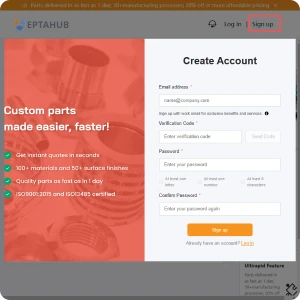
First, set up your EPTAHUB account if you haven’t already. Visit https://online3d.eptahub.com/ and fill in the required fields to get started.
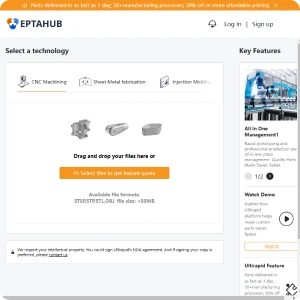
Once your account is ready, go to https://online3d.eptahub.com/ to upload your 3D CAD files—our secure system accepts most common CAD formats. Upload multiple files at once by clicking “Upload 3D Files” or dragging and dropping them into the designated drop zone. You can choose to order immediately at the displayed price and lead time, or tweak your quote further using our platform’s additional features.
We also accept technical drawings! Simply proceed to the part configuration screen to upload your 2D drawings.
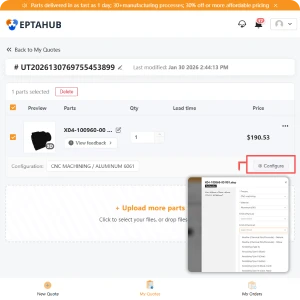
Click “Configure Part” or the file title to customize your order. On the Part Configuration Page, you can specify key details like manufacturing process, material type, surface finish, and order quantity.
Pricing will update in real time based on your selected configurations. For additional features such as tapped holes, inserts, or part markings, as well as requests for material certifications, certificates of conformance, ITAR compliance, or specific lead time requirements, please contact our support team for assistance.
Leave notes for our engineering team and manufacturing partners in the comment box at the bottom of the page. When you’re done, click “Save Properties” in the top right corner.
Pro tip: Explore the built-in resources on the configuration page! Click “! Learn about our materials” to browse our full material catalog, or use the right-side search tool to access design guides and helpful tips.
For a closer look at your CAD file, navigate to the “Analyze” tab. This tool runs an instant DFM check, flagging potential design issues that could affect manufacturability or cost. Use this feedback to refine your design for better efficiency and results.
Pro tip: Rotate and drag the 3D model to inspect it from every angle. Use the left-side module in the 3D viewer to zoom, pan, or isolate specific areas—perfect for verifying details before production.
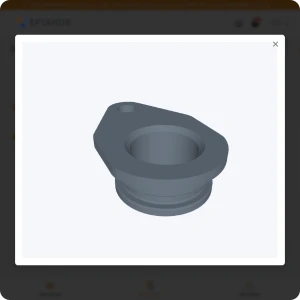
All orders start with our standard shipping, which balances cost and speed. Need your parts faster? Opt for expedited shipping. If you’re working with a flexible timeline, our economy shipping option helps you save on costs.
Learn more about our delivery timeframes in our dedicated article.
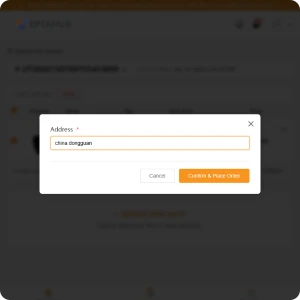
Once you submit your order, our engineering team conducts a final review before assigning it to a trusted manufacturer from our network. That’s it—you’re all set!
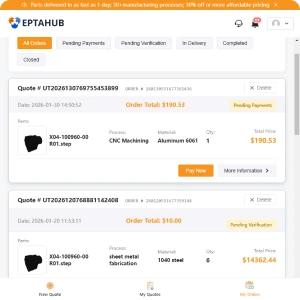
Track your order status anytime by clicking the order number in your Order History page. If you have questions, our customer service team and engineering experts are available to assist you.
Repeat orders are simple to set up after your first purchase. We also accommodate part revisions, special requests (like keeping production with the same manufacturer), and custom requirements. Check our FAQ for more details on repeat orders.
 English English
  German
 Spanish
 French
 Japanese
 Korean
 Malay
Malay
 Portuguese
 Russian
 Thai
Thai
Our automated quoting system gives you instant pricing so you can quickly estimate your project costs.
For high-precision or complex parts, our senior account managers can provide more detailed quotes and help you find the best overall solution for your needs.