










In my 12 years of designing enclosures and validating PCB (Printed Circuit Board) layouts at eptahub.com, thermal management is consistently the number one cause of late-stage design failures. Junior engineers will design an incredibly powerful, compact electronic device, power it on, and watch it physically melt within minutes.
They forget the First Law of Thermodynamics: Energy cannot be created or destroyed, only transformed. When you pump electrical energy into a microprocessor to perform calculations, the vast majority of that energy is transformed into waste heat. If you do not give that heat a place to go, the silicon will exceed its maximum junction temperature (usually around 105°C) and suffer catastrophic thermal runaway.
This brings us to the most critical component in any high-power assembly. What is a heat sink?
Before we look at the hardware, we must clarify the terminology. If you search for What is a heat sink in climate? or What is a heat sink in biology?, you are looking at the broad thermodynamic definition: a “heat sink” is simply an environment or system that absorbs and dissipates heat. In climatology, the Earth’s oceans act as a massive heat sink, absorbing solar radiation. In biology, human skin acts as a heat sink, sweating to dissipate core body temperature into the air.
However, in electrical and mechanical engineering, the definition is highly specific. When we ask what is heat sink in electronics, we are defining a discrete, thermally conductive mechanical component attached to a heat-generating device (like a CPU or power transistor). Its sole heat sink function is to drastically increase the surface area of the heat source, allowing the waste heat to transfer into the surrounding fluid medium (usually air or liquid coolant) at a highly accelerated rate.
How Does a Heat Sink Work?
To understand the heat sink function, you must understand the two primary modes of heat transfer taking place on a circuit board: Conduction and Convection.
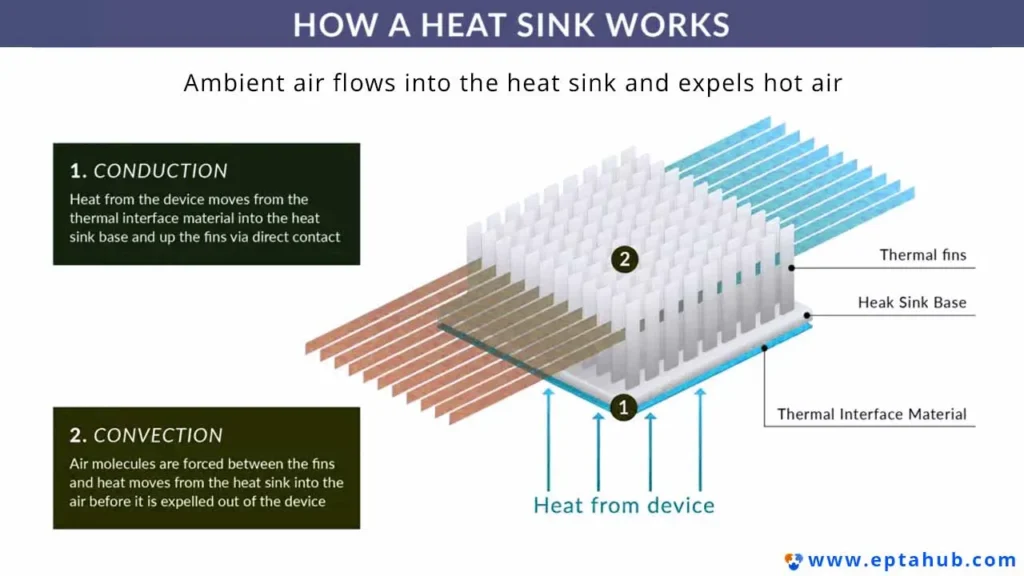
A heat sink does not magically “destroy” heat. It acts as a thermal bridge. Here is the step-by-step physics of how it operates:
- Heat Generation: The silicon die (the processor) generates intense thermal energy.
- Conduction (Solid to Solid): Heat naturally flows from an area of high temperature to an area of low temperature (Fourier’s Law). The heat transfers from the silicon, through the processor’s metal lid, and into the flat base of the heat sink.
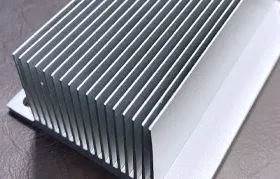
- Distribution: Because the heat sink is made of a highly conductive material (like Aluminum or Copper), the heat rapidly spreads from the base up into a network of vertical fins.
- Convection (Solid to Fluid): This is where the magic happens. The ambient air surrounding the fins is cooler than the metal. As the heat transfers into the air molecules, that air becomes less dense and rises (or is blown away by a fan), taking the thermal energy with it. Cooler air immediately moves in to replace it, creating a continuous cooling cycle.
The Secret of Surface Area
Why not just let the processor cool itself? A typical CPU die is about the size of a postage stamp. It does not have enough physical surface area to interact with enough air molecules to shed its heat. A heat sink takes that 2-square-inch footprint and, through the use of dozens of tall, thin metal fins, expands it to hundreds or even thousands of square inches of surface area.
What is a Heat Sink in a Computer?
When users search for what is a heat sink in a computer, they are usually thinking of the massive block of metal sitting directly in the center of their desktop PC.
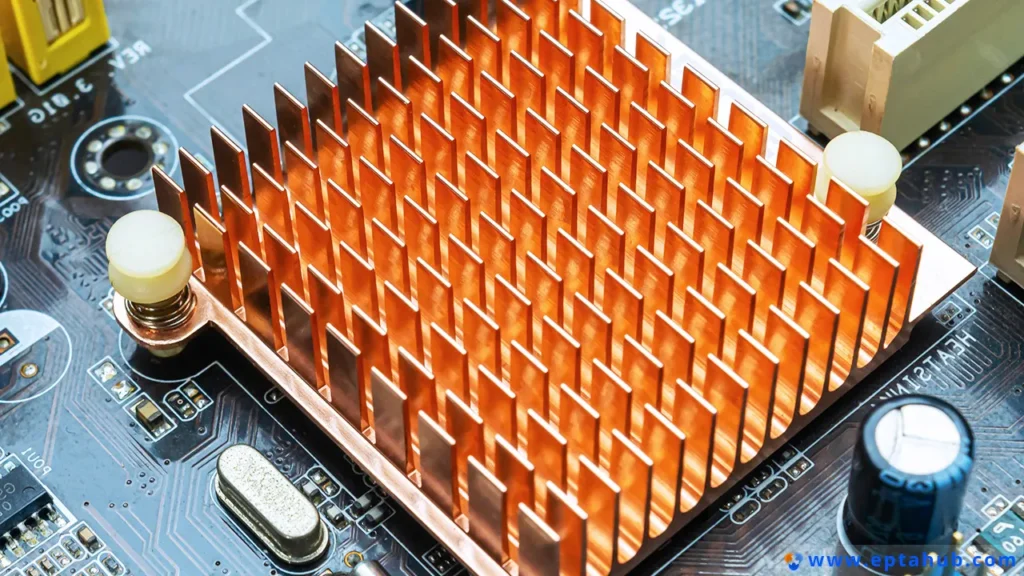
In consumer electronics and servers, heat sinks are deployed on any semiconductor that pushes high wattage.
- CPUs (Central Processing Units) & GPUs (Graphics Processing Units): These are the most power-hungry components, often pulling between 65 to 300+ watts of electricity. Without a massive heat sink, a modern CPU will reach boiling temperatures in less than 3 seconds.
- What is a heat sink in motherboard design? If you look around the CPU socket on a high-end motherboard, you will see smaller, jagged blocks of metal. These are heat sinks cooling the VRMs (Voltage Regulator Modules). VRMs step down the 12-volt power from your wall outlet to the delicate 1.2-volt power your CPU needs. This extreme voltage conversion generates immense heat. If the VRM heat sinks fail, the motherboard will throttle power to the CPU, crashing the system.
What Are the Two Types of Heat Sinks?
When calculating the thermal budget of an enclosure at eptahub.com, the first major architectural decision I must make is choosing between the two fundamental classifications of thermal management. What are the two types of heat sinks? They are categorized by how the ambient air moves across them: Passive and Active.
If you specify the wrong type for your environment, your device will either overheat or suffer mechanical failure.
1. The Passive Heat Sink (Natural Convection)
A passive heat sink relies entirely on the natural buoyancy of hot air. As the fins heat the surrounding air, the hot air rises, pulling cooler air in from the bottom. There are no moving parts, no fans, and no pumps.
- Engineering Advantage: Absolute reliability. Because there are no mechanical fans, there is zero acoustic noise, no bearings to wear out, and no electrical power required. Passive cooling is mandatory for rugged industrial equipment, telecom towers, and aerospace components where a fan failure would cause an unrecoverable system crash.
- Engineering Constraint (Fin Spacing): You cannot just pack a passive heat sink with hundreds of thin fins. In fluid dynamics, air moving against a solid surface creates a “boundary layer” of stagnant, friction-heavy air. If the fins are too close together, the boundary layers merge, choking off the airflow entirely. Passive heat sinks must have widely spaced fins, which makes them physically much larger and heavier than active heat sinks.
2. The Active Heat Sink (Forced Convection)
An active heat sink pairs a metal heat sink with a mechanical device—typically a high-speed fan or a liquid-cooling pump—to violently force a cooling medium across the fins.
- Engineering Advantage: Massive thermal dissipation in a tiny footprint. Because a fan is forcing air through the metal at high static pressure, we can pack the fins incredibly close together. This maximizes surface area and allows us to cool a 300-watt GPU in a confined space.
- Engineering Constraint: A fan is a mechanical point of failure. If the fan bearing seizes due to dust accumulation, the closely packed fins of the active heat sink will immediately choke, natural convection will fail, and the system will overheat.
Engineering Matrix: Passive vs. Active Heat Sinks
Here is the quick-reference matrix we use during the initial CAD layout phase to determine the correct thermal strategy:
| Engineering Metric | Passive Heat Sink (Natural Convection) | Active Heat Sink (Forced Air / Fan) |
|---|---|---|
| Airflow Mechanism | Natural buoyancy (Hot air rises). | Mechanical Fan (High static pressure). |
| Fin Geometry | Widely spaced, thick fins to prevent boundary layer choking. | Tightly packed, ultra-thin fins to maximize surface area. |
| Physical Size | Massive. Requires large volumes of metal to compensate for slow airflow. | Compact. High airflow compensates for a smaller physical footprint. |
| Reliability (MTBF) | Effectively infinite. No moving parts to break. | Limited by the fan’s bearing lifespan (typically 30,000 to 50,000 hours). |
| Ideal Application | Sealed NEMA enclosures, telecom infrastructure, silent PCs. | High-performance desktop PCs, server racks, high-wattage LED arrays. |
Engineering Case Study: The “Sealed Box” Thermal Trap
To illustrate the critical importance of understanding heat sink physics, let’s review a failure analysis I conducted for an agricultural tech client developing a tractor-mounted IoT gateway.

The Scenario: The client designed a powerful processing unit to calculate crop yields in real-time. Because tractors operate in severe dust and rain, the electronics were housed inside a completely sealed, IP67-rated aluminum enclosure. To cool the internal processor, the junior designer specified a high-performance active heat sink (a copper block with a high-speed fan) mounted directly to the chip inside the sealed box.
The Failure: During field testing in the summer heat, the units shut down completely after 45 minutes of operation. The client was baffled. “How is it overheating? We put a 5,000 RPM fan inside the box!”
The Engineering Resolution: The client misunderstood what does a heat sink do. A heat sink does not eliminate heat; it transfers it to the air.
Inside a sealed IP67 box, there is no fresh air. The active fan was working perfectly, violently scrubbing heat off the processor and dumping it into the trapped air inside the enclosure. However, the trapped air had nowhere to go. Within 45 minutes, the ambient air inside the box reached 90°C. At that point, the air was just as hot as the processor. Thermodynamics ground to a halt (zero temperature differential), and the processor melted.
The Fix: I redesigned the thermal architecture from active to passive.
- We removed the internal fan entirely.
- We designed a solid aluminum conduction pillar that transferred the heat directly from the processor to the interior wall of the aluminum enclosure.
- We redesigned the exterior of the aluminum enclosure into a massive, finned passive heat sink.
- Now, the heat bypassed the internal air entirely, conducting straight through the chassis wall and dissipating into the endless ambient air of the outside world via natural convection. The system never exceeded 55°C again.
Why Do You Need Heat Sink Paste?
In the mechanical engineering department at eptahub.com, we often see junior technicians bolt a beautifully machined, $50 copper heat sink directly onto a bare silicon processor, power it up, and immediately trigger a thermal shutdown. They are baffled. The mounting pressure was perfect, and the metal was cold. So, what went wrong?
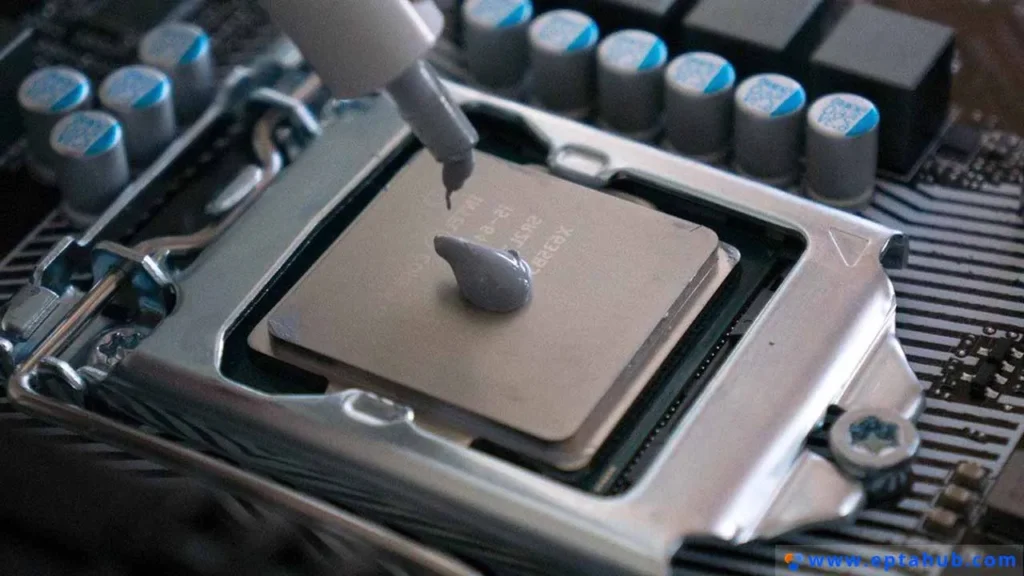
They ignored the microscopic physics of machined surfaces and failed to use heat sink paste.
To the naked eye, the bottom of a heat sink and the top of a CPU look perfectly flat and mirror-smooth. However, under a microscope, these metal surfaces look like jagged mountain ranges with deep valleys and high peaks. When you press these two “flat” metal plates together, the actual metal-to-metal contact area is often less than 10%.
The remaining 90% consists of microscopic air gaps. In thermodynamics, static air is a phenomenal thermal insulator. Those microscopic pockets of trapped air block the heat from transferring out of the CPU and into the heat sink.
The Physics of Thermal Interface Materials (TIM)
To solve this, engineers specify a Thermal Interface Material (TIM), commonly known as heat sink paste or thermal grease.
- Composition: Heat sink paste is a viscous fluid (usually a silicone or synthetic oil base) suspended with microscopic, highly thermally conductive particles (zinc oxide, aluminum oxide, silver, or carbon micro-particles).
- The Engineering Function: You apply a very small amount of this paste between the CPU and the heat sink. When pressure is applied, the paste is squeezed out, perfectly filling every single microscopic valley and displacing the insulating air.
- The Rookie Mistake (More is NOT Better): The thermal conductivity of heat sink paste is significantly lower than solid metal. Its only job is to replace air. If you apply too much paste, you create a thick physical barrier between the two metals, which actually increases thermal resistance and causes the component to overheat. The engineering goal is a layer as thin as molecularly possible.
Selecting the Right Heat Sink Material
When evaluating a BOM for thermal management, the most critical variable after fin geometry is the choice of heat sink material. You cannot simply choose a metal because it looks nice. You must look at its Thermal Conductivity (k), measured in Watts per meter-Kelvin (W/m\cdotpK).
In the industrial manufacturing sector, the debate almost exclusively comes down to two elements: Aluminum and Copper.
1. Aluminum (The Industry Standard)
For 90% of commercial electronics, aluminum is the undisputed king of heat sinks. Specifically, we specify the 6000-series alloys (like 6061 or 6063).
- Thermal Conductivity: Good (k≈200 to 230 W/m\cdotpK).
- Engineering Advantages: Aluminum is incredibly lightweight, inexpensive, and most importantly, highly ductile. This means we can push massive billets of hot aluminum through steel dies (the Extrusion process) to cheaply manufacture thousands of feet of complex, finned heat sink profiles per hour.
- Use Case: Motherboard VRMs, LED lighting fixtures, solid-state drive (SSD) coolers, and general-purpose industrial enclosures.
2. Copper (The High-Performance Heavyweight)
When thermal density reaches extreme levels (such as in server farms, telecommunications infrastructure, or high-end gaming GPUs), aluminum simply cannot move the heat away from the silicon fast enough. We must pivot to copper.
- Thermal Conductivity: Excellent (k≈400 W/m\cdotpK). Copper transfers heat nearly twice as fast as aluminum.
- Engineering Disadvantages: It is extremely expensive, prone to rapid oxidation (turning green/brown), and incredibly dense (heavy). Furthermore, copper is notoriously difficult to extrude into complex fin shapes. It usually requires expensive CNC machining or a process called “skiving” (where a blade literally shaves and bends vertical fins out of a solid block of copper).
3. The Hybrid Solution (Copper Base + Aluminum Fins)
At eptahub.com, we frequently engineer a compromise to get the best of both worlds. We design a heat sink with a solid Copper Baseplate and Aluminum Fins.
- The Physics: The copper baseplate sits directly on the CPU. Its massive thermal conductivity acts as a rapid “heat spreader,” pulling the intense thermal spike away from the tiny silicon die and spreading it across a wide footprint. That heat is then transferred up into the attached aluminum fins, which cheaply and lightly handle the convection process into the air.
Advanced Thermal Dynamics: Heat Pipes and Vapor Chambers
As microprocessors continue to shrink while power consumption skyrockets, even solid copper is no longer fast enough. Modern engineering has shifted from solid-state conduction to phase-change thermodynamics.
If you look at a high-end CPU cooler, you will see copper tubes running through the aluminum fins. These are not solid metal; they are Heat Pipes.
- The Anatomy: A heat pipe is a hollow, sealed copper tube. The inside walls are lined with a porous capillary wick (like a metallic sponge). The tube is put under a strict vacuum, and a small amount of working fluid (usually purified water) is sealed inside.
- Evaporation (Heat Absorption): Because the tube is under a vacuum, the water inside boils at a much lower temperature (e.g., 30°C instead of 100°C). When the heat from the CPU hits the bottom of the pipe, the water instantly vaporizes into steam, absorbing a massive amount of thermal energy (Latent Heat of Vaporization).
- Vapor Transfer: The high-pressure steam rockets up the hollow center of the tube at near the speed of sound, traveling to the cooler end of the pipe (where the metal fins and fans are located).
- Condensation (Heat Release): As the steam hits the cold zone, it condenses back into a liquid, violently releasing all its stored heat into the fins.
- Capillary Action: The liquid water is then pulled back down to the heat source through the porous wick via capillary action (defying gravity), and the cycle repeats endlessly.
A heat pipe can transfer thermal energy thousands of times faster than a solid block of copper. When an engineer flattens a massive heat pipe into a wide, flat plate to cover an entire graphics card, it is called a Vapor Chamber. This phase-change technology is the only reason modern, ultra-thin gaming laptops do not instantly catch fire under load.
References
To standardize your internal thermal management protocols and ensure your heat sink designs meet rigorous industrial testing criteria, please refer to the following engineering standards:
- IEEE Transactions on Components, Packaging and Manufacturing Technology
The premier peer-reviewed academic journal for mechanical and electrical engineers detailing cutting-edge advancements in phase-change cooling, vapor chambers, and micro-fluidic heat sink geometries.
Link: IEEE Xplore - ASHRAE (American Society of Heating, Refrigerating and Air-Conditioning Engineers) TC 9.9
The definitive guidelines for thermal management at the macro scale. It dictates the environmental operating envelopes, airflow requirements, and cooling infrastructure necessary for large-scale data centers and server racks utilizing high-density heat sinks.
Link: ASHRAE.org